

Change Page Size of PDF Online Free – Resize PDF Pages Instantly
🚀 Resize PDF pages for free with SmartPDFNow! No sign-up, no watermarks, unlimited use.
Have you ever opened a PDF and found that the pages are the wrong size? Maybe the document is in A4 but you need Letter, or the pages are mixed sizes and look unprofessional. Perhaps you need to resize a PDF for printing, sharing, or uploading to a platform with strict dimension requirements. Manually changing page sizes in desktop software is tedious and often requires expensive tools. The solution? Use an online tool to change page size of PDF quickly and for free. In this guide, we'll show you exactly how using SmartPDFNow's free PDF page resizer. You'll learn the steps, tips, and best practices to get perfectly sized pages every time.
Why You Might Need to Change PDF Page Size
PDF page size matters more than most people realize. Here are common scenarios where resizing is necessary:
- Printing: Your printer may require A4, Letter, Legal, or a custom size. A mismatched PDF can cause cropping or wasted paper.
- Submission requirements: Government forms, academic papers, and business proposals often specify exact page dimensions.
- Professional appearance: Mixed page sizes (e.g., A4 and Letter in the same document) look sloppy and unprofessional.
- Digital publishing: E-books and online documents often need a standard size for consistent viewing.
- File size optimization: Sometimes reducing page size also reduces file size, making sharing easier.
Whatever the reason, being able to change PDF page size online is a valuable skill.
Common Page Sizes You Should Know
Here are the most frequently used PDF page dimensions:
- A4: 210 × 297 mm (8.27 × 11.69 inches) — standard in most countries outside North America.
- Letter: 216 × 279 mm (8.5 × 11 inches) — standard in the United States and Canada.
- A3: 297 × 420 mm (11.69 × 16.54 inches) — larger size for posters, diagrams, and spreadsheets.
- A5: 148 × 210 mm (5.83 × 8.27 inches) — half of A4, often used for booklets and flyers.
- Legal: 216 × 356 mm (8.5 × 14 inches) — commonly used for legal documents in the US.
- Custom: Any width and height you specify in mm, cm, inches, or pixels.
SmartPDFNow's resizer supports all these standard sizes and lets you enter custom dimensions for complete flexibility.
What to Look for in an Online PDF Page Resizer
Not all page resizing tools are equal. Here are the key features to consider:
- Support for standard and custom sizes: A4, Letter, Legal, A3, and custom dimensions.
- Batch processing: Apply the new size to all pages at once, not one by one.
- Preserves content: The resized pages should keep text and images clear, without distortion or cropping.
- No watermarks: Free output should be clean.
- No sign-up required: Avoid tools that force account creation.
- Unlimited use: No daily caps or page count limits.
- Privacy: Files should be encrypted and deleted after processing.
- Fast processing: Even large PDFs should resize quickly.
SmartPDFNow's PDF page resizer meets all these criteria. It's free, unlimited, and secure.
Step-by-Step: How to Change Page Size of PDF Online
Follow these simple steps to resize your PDF pages:
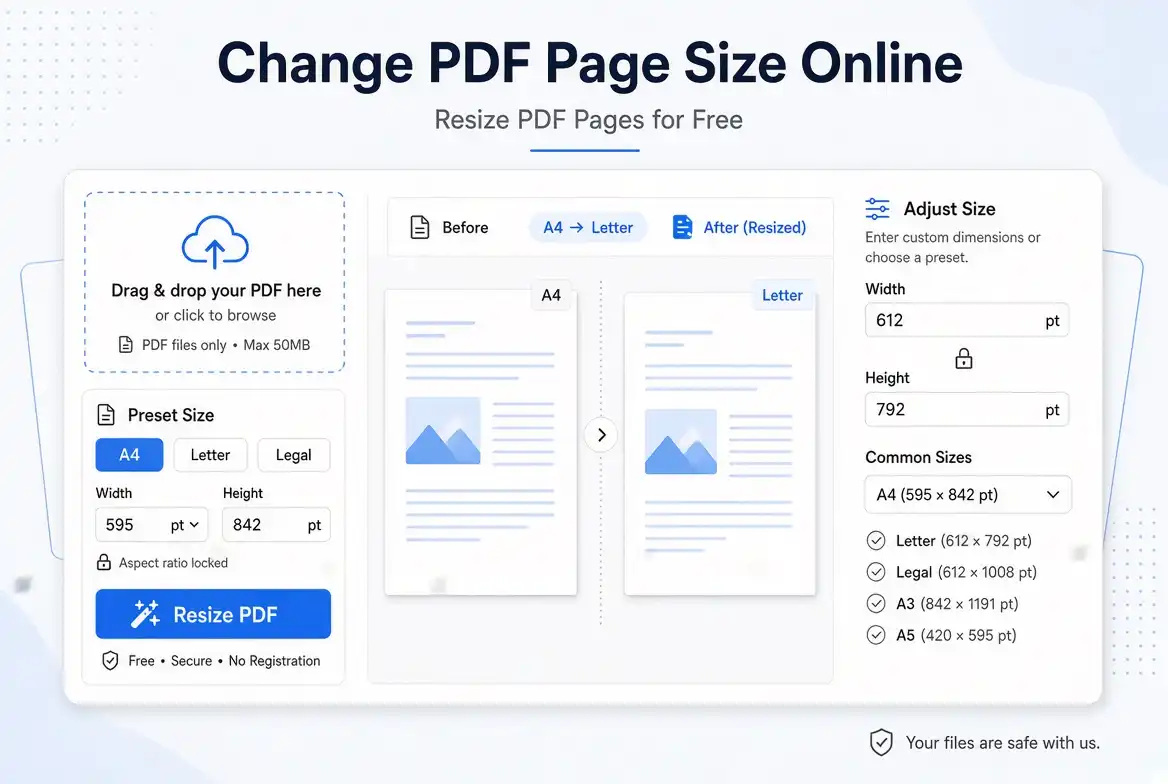
Go to smartpdfnow.com/resize-pdf in any web browser.
Drag and drop your PDF file into the upload area, or click to browse from your device. SmartPDFNow accepts files up to 100 MB.
Choose from common presets like A4, Letter, A3, A5, or Legal. If you need a custom size, enter the width and height manually in millimeters, centimeters, inches, or pixels.
Decide whether to apply the new size to all pages or just a specific range. For consistency, it's usually best to resize all pages.
The tool will process the file and adjust each page to the new dimensions. This typically takes only a few seconds.
Save the updated PDF to your device. Open it to verify that all pages are now the correct size and that content is not distorted or cropped.
Change Your PDF Page Size for Free Now
Use SmartPDFNow — unlimited, no sign-up, no watermarks.
Resize PDF PagesReal-Life Example: A Freelancer Fixes Mixed Page Sizes
Ahmed, a freelance architect in Casablanca, regularly submits PDF drawings to clients and government offices. One day, he noticed his PDF contained a mix of A4 and Letter pages because he had combined files from different sources. The client rejected the submission, citing inconsistent page sizes. Frustrated, Ahmed searched for a quick solution and found SmartPDFNow's PDF page resizer. He uploaded the PDF, selected A4, and applied it to all pages. Within seconds, every page was perfectly uniform. The client accepted the resubmission, and Ahmed now uses the tool before every submission. "It takes less than a minute," he said. "And it saved me a lot of embarrassment."
Tips for Perfect PDF Page Resizing
- Check the original page size first. Use a PDF reader to see the current dimensions before resizing.
- Choose the right preset. If you're in Europe, A4 is standard. In the US, Letter is standard. Know your audience.
- Avoid unnecessary resizing. Resizing from A4 to Letter (or vice versa) rarely changes much visually, but it can affect printing alignment. Only resize when necessary.
- Verify content after resizing. Make sure no text or images are cut off or stretched. Good tools preserve the aspect ratio and content position.
- Keep a backup. Save the original PDF in case you need to revert or try a different size.
Frequently Asked Questions
Can I change the page size of a PDF without losing quality?
Yes. SmartPDFNow's resizer preserves text and images clearly. It does not compress or distort content; it only adjusts the canvas size. The original content remains at its native resolution.
Can I change page size from A4 to Letter online?
Absolutely. SmartPDFNow lets you switch between all common presets, including A4 and Letter. The difference between the two is small, but the tool adjusts precisely.
Can I set a custom page size for my PDF?
Yes. In addition to presets, SmartPDFNow allows you to enter custom width and height in mm, cm, inches, or pixels. This is useful for unusual print jobs or specific submission requirements.
Is it safe to upload my PDF to SmartPDFNow?
Yes. Files are encrypted during transfer and automatically deleted after processing. SmartPDFNow never stores or shares your documents. Your privacy is protected.
Can I resize multiple PDFs at once?
SmartPDFNow currently processes one file at a time. However, if you have multiple PDFs that need the same page size, you can resize them one after another quickly. The tool is fast and free with no limits.
Conclusion: Resize PDF Pages in Seconds with SmartPDFNow
Changing the page size of a PDF doesn't have to be a technical headache. With SmartPDFNow's free online PDF page resizer, you can adjust pages to A4, Letter, Legal, or any custom dimension in seconds. No software to install, no watermarks, and no sign-up. Whether you're a student, freelancer, or business professional, this tool will save you time and frustration. Try it now and give your PDFs the perfect dimensions.
Ready to Resize Your PDF Pages for Free?
Visit SmartPDFNow — unlimited, no sign-up, no watermarks.
Change Page Size Now
Discussion (0)
No comments yet. Be the first to share your thoughts!